> ## Documentation Index
> Fetch the complete documentation index at: https://docs.kreo.app/llms.txt
> Use this file to discover all available pages before exploring further.
# Unusual Activity
> Unusual activity is a live detection feed for wallets doing “weird” things on-chain. It’s built to surface **possible informed trading** before the crowd reacts.
We flag activity that matches our criteria, like:
* Fresh wallets making their first meaningful move.
* Large, one-sided deposits into a single position.
* Sudden size relative to market liquidity.
* Fast sequences of buys/sells that look intentional.
This is a signal feed, not proof of insider information. Use it as research input, then verify context before trading.
Each card is a market where we detected an unusual wallet action. Cards update in real time as new events come in.
Use the top bar to filter by platform (ex: **Polymarket** / **Kalshi**). Use search + filters to reduce noise.
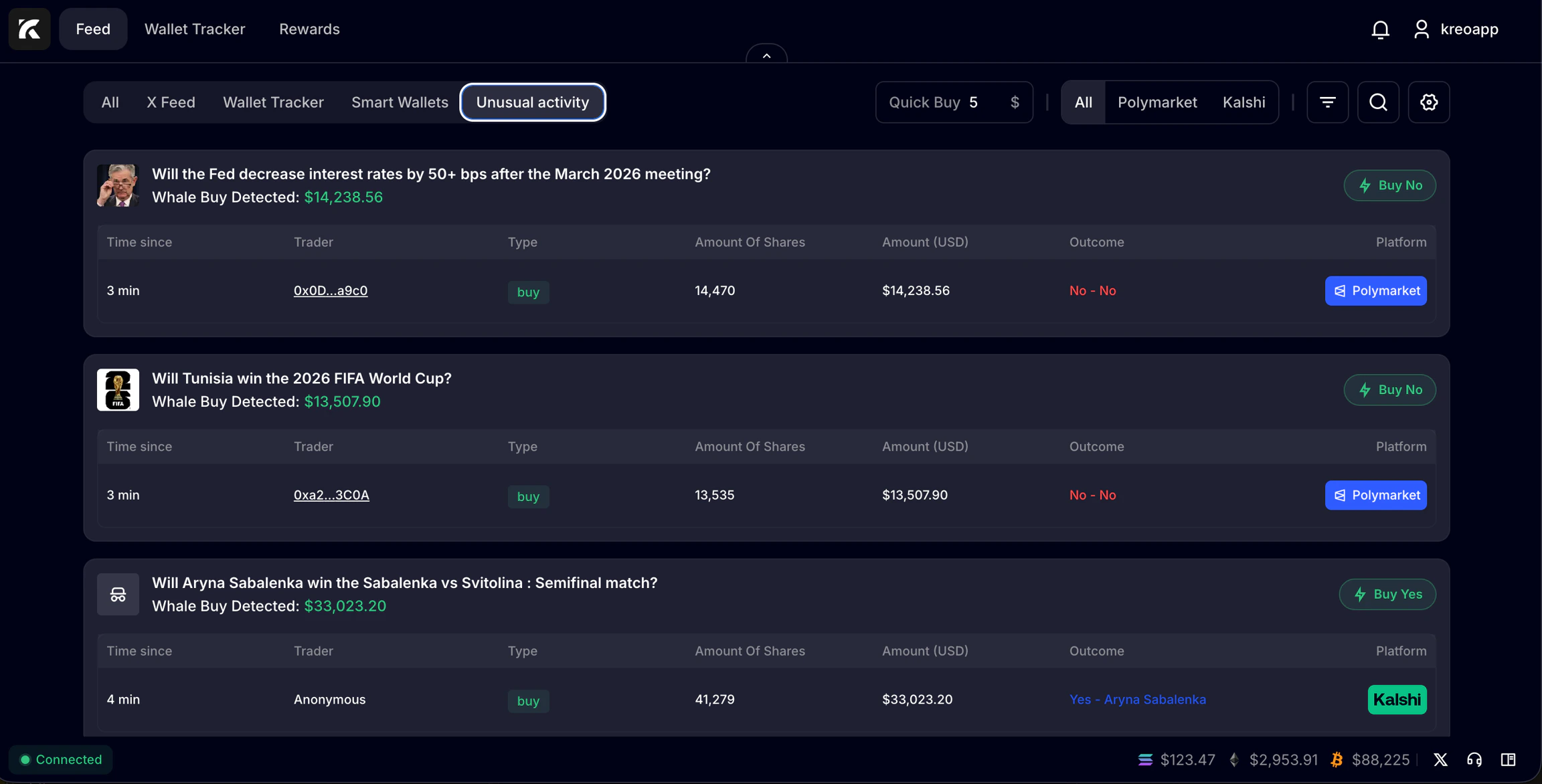 Detailed inputs on what occured onchain, and how it may be relevant.
* **Time since**: how recent the action is.
* **Trader**: the wallet address or label (if known).
* **Type**: buy / sell / deposit style action (as shown).
* **Amount of shares** and **Amount (USD)**: size.
* **Outcome**: what side they took (Yes/No, or market-specific outcome).
* **Platform**: where it happened.
Set **Quick Buy** at the top to your default order size. This keeps execution consistent when you’re reacting to a live feed.
Adjust it any time with one click.
Use **Buy Yes** / **Buy No** on the market card to place an order instantly and have it confirm inside of the Telegram Bot.
Detailed inputs on what occured onchain, and how it may be relevant.
* **Time since**: how recent the action is.
* **Trader**: the wallet address or label (if known).
* **Type**: buy / sell / deposit style action (as shown).
* **Amount of shares** and **Amount (USD)**: size.
* **Outcome**: what side they took (Yes/No, or market-specific outcome).
* **Platform**: where it happened.
Set **Quick Buy** at the top to your default order size. This keeps execution consistent when you’re reacting to a live feed.
Adjust it any time with one click.
Use **Buy Yes** / **Buy No** on the market card to place an order instantly and have it confirm inside of the Telegram Bot.