> ## Documentation Index
> Fetch the complete documentation index at: https://docs.kreo.app/llms.txt
> Use this file to discover all available pages before exploring further.
# Sport Advanced
> Access Advanced Settings by tapping **⚙️ Advanced** from the Edit Task menu. From here you can fine-tune how the bot enters and exits trades.
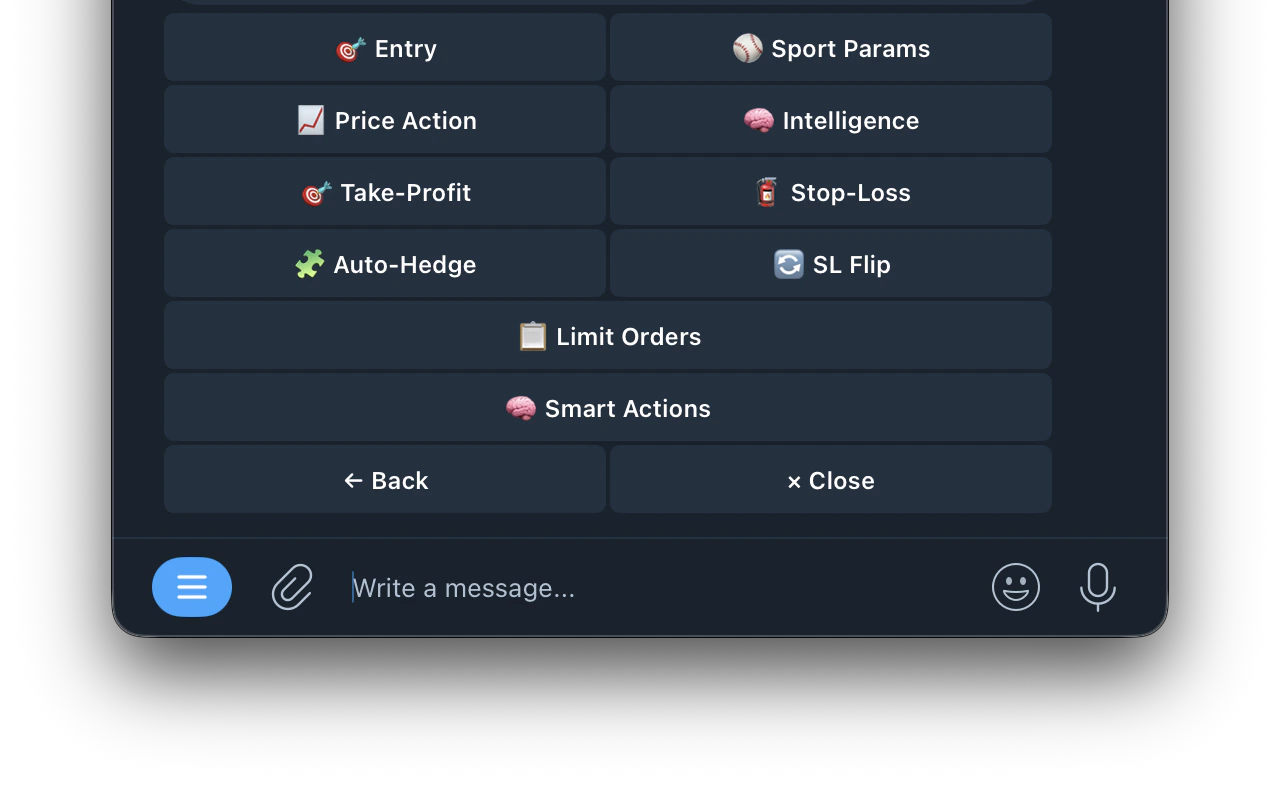 ## 🎯 Entry
Filter which markets the bot is allowed to trade based on price and side.
only enter when the buy price (odds) is within your set range. Lower prices = higher potential payout but less likely to win
maximum gap between buy and sell price. Tighter spread = better liquidity and less slippage
which token types the bot can buy. Only applies to 3-way markets (e.g. soccer: Home Win / Draw / Away Win). Options: Yes, No or Both
maximum entries on a single price spike before waiting for cooldown
seconds to wait between spikes before allowing new entries
maximum entries across all spikes for one game
## 📈 Price Action
Detects sharp odds movements and trades automatically. The bot monitors each token's price over a time window and enters when the move exceeds your threshold.
how far back in seconds to measure price movement. Set to 0 to disable
minimum price change within the window to trigger an entry. Set to 0 to disable
which price movement triggers a buy
triggers on any movement but only buys the rising side
buys the rising token (momentum). e.g. Portugal scores → buys "Portugal Win: Yes" as it spikes⬇️ **Down**
buys the falling token (dip buy). e.g. Portugal scores → buys "Mexico Win: Yes" while it's cheap
minimum price updates in the buffer before the bot can enter. Filters out low-liquidity markets
## 🧠 Intelligence
Extra protection that works alongside your TP/SL. These features never replace your existing exits, they only add smarter ones.
Makes the bot more trigger-happy in late-game and close-score situations where odds tend to swing harder.
* **Late-Game Boost**: how aggressive to get near the end. 1.5x = 50% easier to trigger, 2.0x = twice as easy
* **Close-Score Boost**:⚡ Smart Exits extra sensitivity when teams are neck and neck
* **Ramp Start** — when to start ramping up (e.g. Soccer \~60 min, NFL \~40 min, NBA \~35 min)
Gets you out early when your position shows bad signs — before TP/SL would react.
* **Momentum**: sells stale positions that never moved after entry
* **Reversal**: sells when profit starts fading fast from its peak
* **Liquidity**: sells when the market goes dead with too few price updates
When the other team scores, your stop-loss automatically gets tighter so you exit faster if things keep going wrong.
Requires Stop-Loss to be enabled.
**Example (50% tighten):** You enter at 0.60 with SL at 0.48 → Opponent scores → SL moves to 0.54 → Opponent scores again → SL moves to 0.57. Each goal cuts the gap in half so you exit sooner if on the wrong side.
Detects when orders get pulled from the book before a price spike — sees the empty book before the price moves.
* **Mode:**
* **Standalone**: enters on orderbook changes alone. Best for sports as it enters before price moves
* **Confirm**: waits for price to move AND book to thin. Safer but slower
* **Boost**: lowers the price action threshold when depth confirms
For sports use **Standalone**Advanced Depth Settings: the edge is entering before price moves. For crypto use **Confirm** for safer double-checked entries.
* **Sensitivity:** Low, Medium or High
* **Spread Gap** — triggers when the bid-ask spread blows open wider than your set threshold in cents
* **Depth Drop**: how much ask/bid volume must drop from baseline to trigger (default 45%)
* **Baseline Window**: how far back to look for normal book state (default 20s)
* **Recent Window**: how many seconds of recent data to compare against baseline (default 2s)
* **Imbalance Shift**: how much the bid/ask ratio must change from baseline (default 0.25)
* **Spread Multiplier**: current spread must be this many times wider than baseline (default 2.5x)
* **Price Gap**: triggers when best ask or bid jumps by this many cents in seconds (default 3¢)
* **Boost Reduction**: in Boost mode, how much to lower the price action threshold when depth confirms (default 30%)
## 🎯 Take-Profit
Automatically sells when price moves in your favor by your set %. [Click here for more details ](https://docs.kreo.app/take-profit)
## 🧯 Stop-Loss
automatically sells when price drops by your set % [Click here for more details](https://docs.kreo.app/stop-loss-settings)
## 🧩 Auto-Hedge
Auto-Hedge monitors the opposite side of your position and enters a hedge when the estimated result is net-positive after fees.
* Monitors the opposite-side live price while the market is open
* Sends a hedge only when your thresholds are met
* If thresholds are not met, it waits and skips bad hedges
* **Enabled**: turn Auto-Hedge on or off
* **Min Profit**: required net profit after fees before hedging (e.g. 2.00%)
* **Max Combined Cost**: entry price + hedge price must stay at or below this value (e.g. 0.970)
* **Auto-Merge**: when on, automatically merges YES+NO pairs and redeems to \~\$1 USDC per pair on-chain after hedge fills. When off, both sides remain in wallet for manual management
## 🔄 SL Flip
When your stop-loss triggers it usually means price moved against you. SL Flip automatically enters the opposite side immediately to ride that confirmed move.
**Example:** You bought Up at \$0.80 and price drops to \$0.55 triggering your stop-loss. SL Flip instantly buys Down to capture the confirmed downward move.
* **Enabled**: turn SL Flip on or off
* **Amount**: how much of the original trade to use for the flip (100% = same size)
* **Max Entry Price**: skip the flip if the opposite side costs more than this
* **Min Time Remaining:** skip the flip if the market window is about to close
* **Flip Stop-Loss**: stop-loss % for the flip trade (0 = uses your task's default SL)
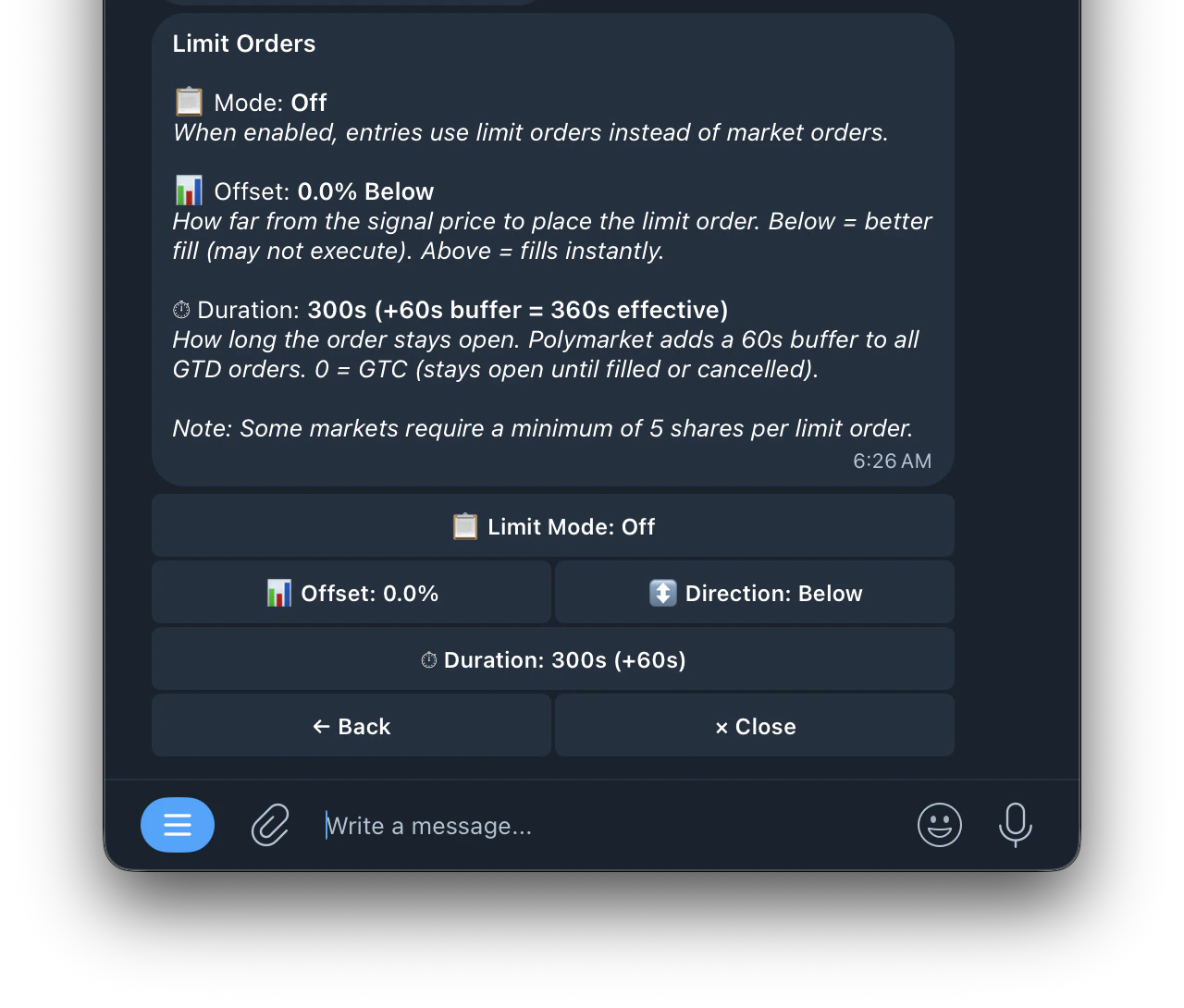
## 📋 Limit Orders
Place limit orders instead of market orders for potentially better fills.
## 🎯 Entry
Filter which markets the bot is allowed to trade based on price and side.
only enter when the buy price (odds) is within your set range. Lower prices = higher potential payout but less likely to win
maximum gap between buy and sell price. Tighter spread = better liquidity and less slippage
which token types the bot can buy. Only applies to 3-way markets (e.g. soccer: Home Win / Draw / Away Win). Options: Yes, No or Both
maximum entries on a single price spike before waiting for cooldown
seconds to wait between spikes before allowing new entries
maximum entries across all spikes for one game
## 📈 Price Action
Detects sharp odds movements and trades automatically. The bot monitors each token's price over a time window and enters when the move exceeds your threshold.
how far back in seconds to measure price movement. Set to 0 to disable
minimum price change within the window to trigger an entry. Set to 0 to disable
which price movement triggers a buy
triggers on any movement but only buys the rising side
buys the rising token (momentum). e.g. Portugal scores → buys "Portugal Win: Yes" as it spikes⬇️ **Down**
buys the falling token (dip buy). e.g. Portugal scores → buys "Mexico Win: Yes" while it's cheap
minimum price updates in the buffer before the bot can enter. Filters out low-liquidity markets
## 🧠 Intelligence
Extra protection that works alongside your TP/SL. These features never replace your existing exits, they only add smarter ones.
Makes the bot more trigger-happy in late-game and close-score situations where odds tend to swing harder.
* **Late-Game Boost**: how aggressive to get near the end. 1.5x = 50% easier to trigger, 2.0x = twice as easy
* **Close-Score Boost**:⚡ Smart Exits extra sensitivity when teams are neck and neck
* **Ramp Start** — when to start ramping up (e.g. Soccer \~60 min, NFL \~40 min, NBA \~35 min)
Gets you out early when your position shows bad signs — before TP/SL would react.
* **Momentum**: sells stale positions that never moved after entry
* **Reversal**: sells when profit starts fading fast from its peak
* **Liquidity**: sells when the market goes dead with too few price updates
When the other team scores, your stop-loss automatically gets tighter so you exit faster if things keep going wrong.
Requires Stop-Loss to be enabled.
**Example (50% tighten):** You enter at 0.60 with SL at 0.48 → Opponent scores → SL moves to 0.54 → Opponent scores again → SL moves to 0.57. Each goal cuts the gap in half so you exit sooner if on the wrong side.
Detects when orders get pulled from the book before a price spike — sees the empty book before the price moves.
* **Mode:**
* **Standalone**: enters on orderbook changes alone. Best for sports as it enters before price moves
* **Confirm**: waits for price to move AND book to thin. Safer but slower
* **Boost**: lowers the price action threshold when depth confirms
For sports use **Standalone**Advanced Depth Settings: the edge is entering before price moves. For crypto use **Confirm** for safer double-checked entries.
* **Sensitivity:** Low, Medium or High
* **Spread Gap** — triggers when the bid-ask spread blows open wider than your set threshold in cents
* **Depth Drop**: how much ask/bid volume must drop from baseline to trigger (default 45%)
* **Baseline Window**: how far back to look for normal book state (default 20s)
* **Recent Window**: how many seconds of recent data to compare against baseline (default 2s)
* **Imbalance Shift**: how much the bid/ask ratio must change from baseline (default 0.25)
* **Spread Multiplier**: current spread must be this many times wider than baseline (default 2.5x)
* **Price Gap**: triggers when best ask or bid jumps by this many cents in seconds (default 3¢)
* **Boost Reduction**: in Boost mode, how much to lower the price action threshold when depth confirms (default 30%)
## 🎯 Take-Profit
Automatically sells when price moves in your favor by your set %. [Click here for more details ](https://docs.kreo.app/take-profit)
## 🧯 Stop-Loss
automatically sells when price drops by your set % [Click here for more details](https://docs.kreo.app/stop-loss-settings)
## 🧩 Auto-Hedge
Auto-Hedge monitors the opposite side of your position and enters a hedge when the estimated result is net-positive after fees.
* Monitors the opposite-side live price while the market is open
* Sends a hedge only when your thresholds are met
* If thresholds are not met, it waits and skips bad hedges
* **Enabled**: turn Auto-Hedge on or off
* **Min Profit**: required net profit after fees before hedging (e.g. 2.00%)
* **Max Combined Cost**: entry price + hedge price must stay at or below this value (e.g. 0.970)
* **Auto-Merge**: when on, automatically merges YES+NO pairs and redeems to \~\$1 USDC per pair on-chain after hedge fills. When off, both sides remain in wallet for manual management
## 🔄 SL Flip
When your stop-loss triggers it usually means price moved against you. SL Flip automatically enters the opposite side immediately to ride that confirmed move.
**Example:** You bought Up at \$0.80 and price drops to \$0.55 triggering your stop-loss. SL Flip instantly buys Down to capture the confirmed downward move.
* **Enabled**: turn SL Flip on or off
* **Amount**: how much of the original trade to use for the flip (100% = same size)
* **Max Entry Price**: skip the flip if the opposite side costs more than this
* **Min Time Remaining:** skip the flip if the market window is about to close
* **Flip Stop-Loss**: stop-loss % for the flip trade (0 = uses your task's default SL)
## 📋 Limit Orders
Place limit orders instead of market orders for potentially better fills.
 ## 🧠 Smart Actions
Automatically adjust task settings based on performance and game state
## 🧠 Smart Actions
Automatically adjust task settings based on performance and game state
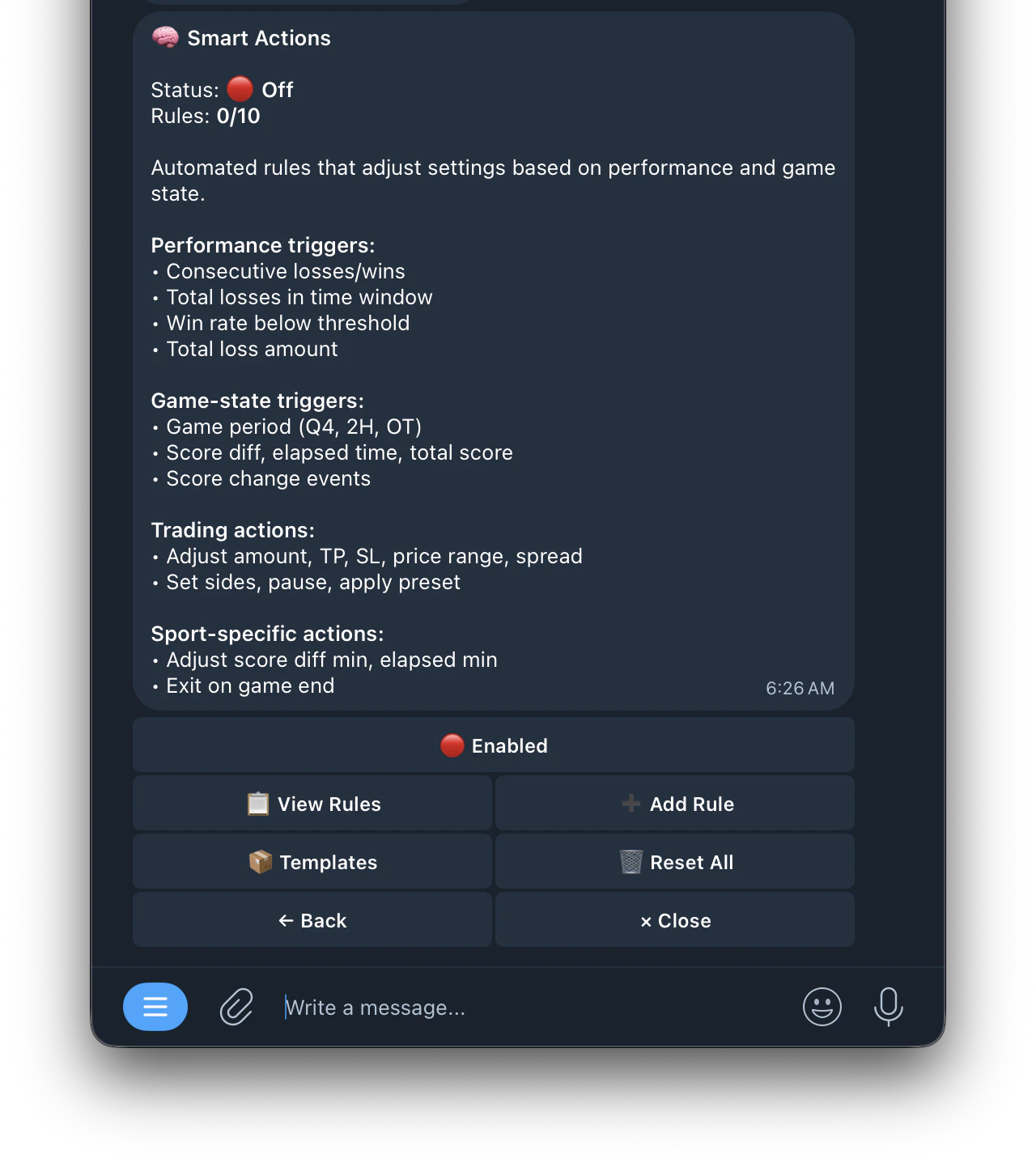 | Buttons | Function |
| :-------------------- | :------------------------------------- |
| **📋 View Rules** | see all active rules |
| **➕ Add Rule** | create a new rule with a 5 step wizard |
| **📦 Templates** | apply pre-built rule templates |
| **🗑️ Reset Runtime** | reset the rule counters |
| Buttons | Function |
| :-------------------- | :------------------------------------- |
| **📋 View Rules** | see all active rules |
| **➕ Add Rule** | create a new rule with a 5 step wizard |
| **📦 Templates** | apply pre-built rule templates |
| **🗑️ Reset Runtime** | reset the rule counters |