> ## Documentation Index
> Fetch the complete documentation index at: https://docs.kreo.app/llms.txt
> Use this file to discover all available pages before exploring further.
# Positions
> Managing your positions is super easy with Kreo, run /positions or press the positions button to access the menu.
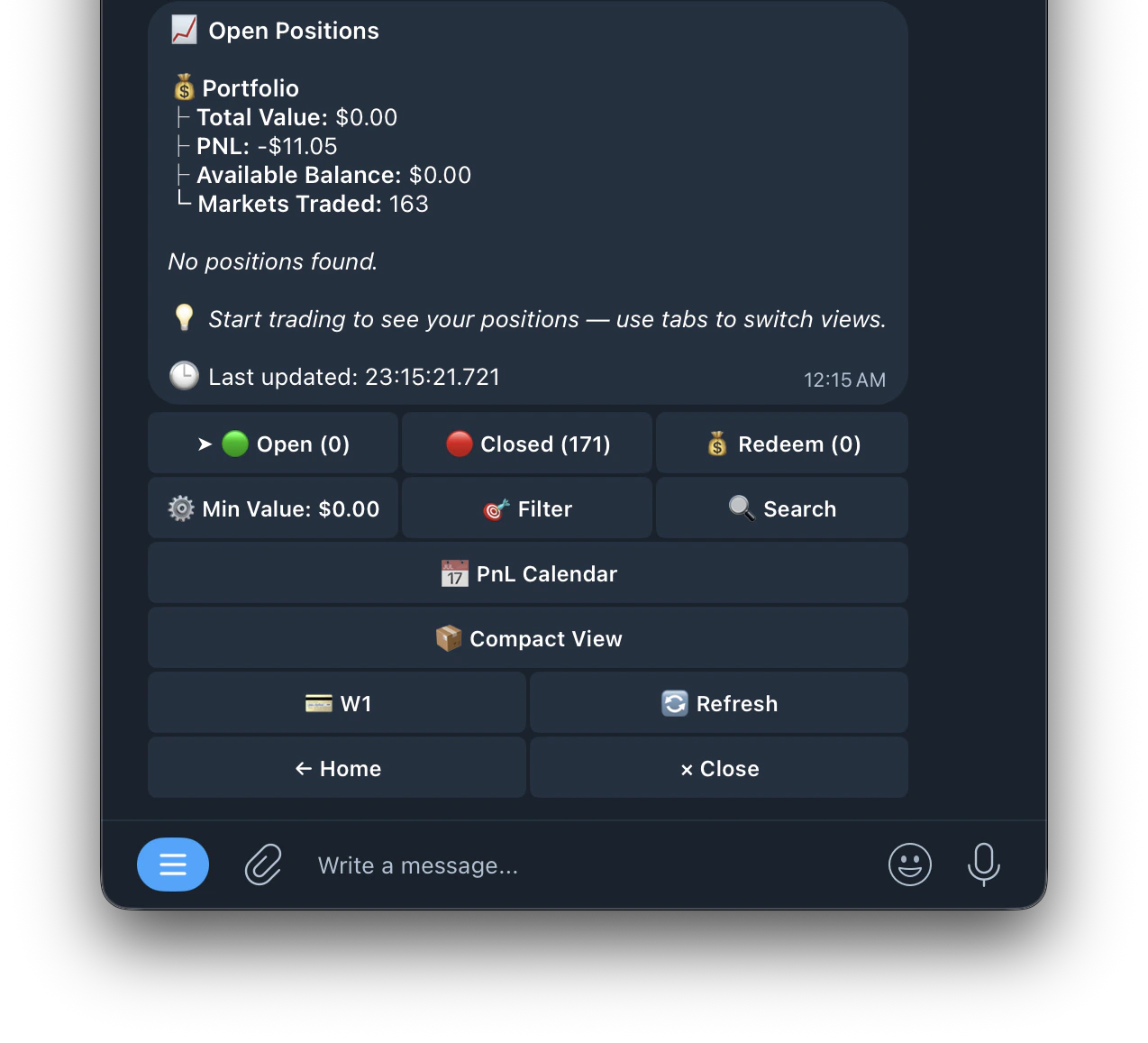 This is your positions menu, where you can access and manage any of your live, closed, or redeemable trades.\
\
Positions are paginated — use the navigation buttons to browse through all your open, closed, and redeemable positions
**Live PnL Stats**: view detailed profit and loss at a glance directly from the positions list without needing to tap into each position individually
A brief explanation on each section 🔻
This is your positions menu, where you can access and manage any of your live, closed, or redeemable trades.\
\
Positions are paginated — use the navigation buttons to browse through all your open, closed, and redeemable positions
**Live PnL Stats**: view detailed profit and loss at a glance directly from the positions list without needing to tap into each position individually
A brief explanation on each section 🔻
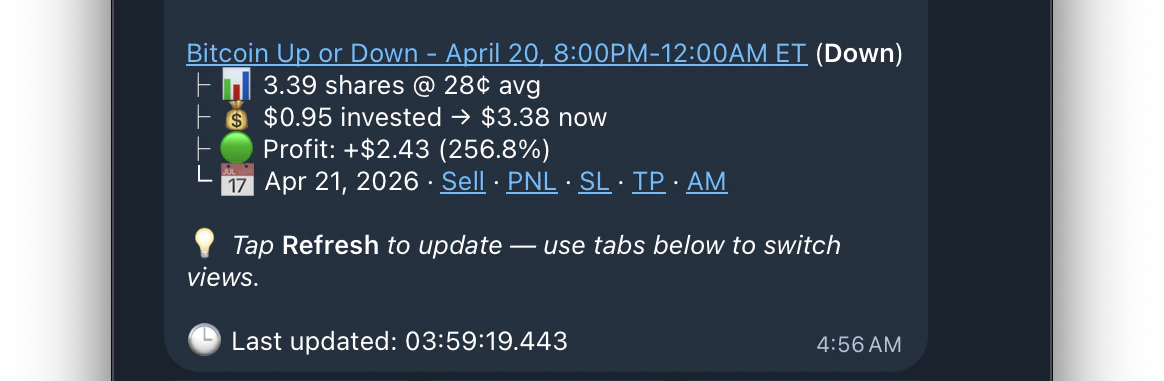 | Name | What it means | |
| --------------------- | --------------------------------------------------------------------------- | - |
| Open Positions | Highlights all open positions currently, and your portfolio worth and value | |
| Market Name (in blue) | This hyperlinks the position to it's respective market on Polymarket/Kalshi | |
| Amount of Shares | The amount of shares and what price the shares are at right now | |
| Amount Invested | The amount you invested and what is worth now | |
| Profit | Amount of Profit/Loss currently | |
| Expiry Date | Date the position will resolve | |
| Button | What it does |
| ----------------- | ------------------------------------------------------------------------------------- |
| 🟢 Open | Sorts all positions by which are open currently |
| 🔴 Closed | Sorts all positions by which have either been closed or expired |
| 💰 Redeem | Sorts all positions by which are redeemable currently |
| ⬇️ Desc | Sorts positions to either be descending or ascending |
| 🟢 Profit | Sorts positions descending/ascending by Profit |
| 🔴 Size | Sorts positions descending/ascending by Size |
| 🔴 Date | Sorts positions descending/ascending by Expiration Date |
| 🔴 Opened | Sorts by the date the position was opened |
| ⚙️ Min Value | Sorts positions by minimum value inputted |
| 🔍 Search | Sorts your positions by market name to find a specific trade quickly. |
| Sell | Brings up the sell panel |
| PNL | Brings up PNL generation panel, and asks whether to generate based on % or \$ amount. |
| SL | Brings up panel to set a trailing stop loss on your position |
| TP | Set a take profit on your position |
| AM | Auto-Merge your YES and NO positions on the same market |
| 💳 Wallet | Allows you to switch between different wallets, and see the positions within them |
| 🔄 Refresh | Refreshes all values to be up to date for all positions |
| 📋 Task Name | Sorts positions by which copy trade task placed the trade |
| 🔍 Leader Address | Sorts positions by the target wallet address being copied |
| Compact View | View positions in a compact layout for easier browsing |
| PnL Calendar | Track your daily profits and losses week by week |
### Auto Redeem
Enable Auto Redeem in /settings to automatically claim your winning positions when they resolve. You can also manually redeem from the 💰 Redeem tab.
### Burn All
Clears all losing positions that resolved at \$0 from your portfolio. These positions are worthless but still show in your positions list. Burning them cleans up your view. You can also enable Auto Burn in /settings to do this automatically.
| Name | What it means | |
| --------------------- | --------------------------------------------------------------------------- | - |
| Open Positions | Highlights all open positions currently, and your portfolio worth and value | |
| Market Name (in blue) | This hyperlinks the position to it's respective market on Polymarket/Kalshi | |
| Amount of Shares | The amount of shares and what price the shares are at right now | |
| Amount Invested | The amount you invested and what is worth now | |
| Profit | Amount of Profit/Loss currently | |
| Expiry Date | Date the position will resolve | |
| Button | What it does |
| ----------------- | ------------------------------------------------------------------------------------- |
| 🟢 Open | Sorts all positions by which are open currently |
| 🔴 Closed | Sorts all positions by which have either been closed or expired |
| 💰 Redeem | Sorts all positions by which are redeemable currently |
| ⬇️ Desc | Sorts positions to either be descending or ascending |
| 🟢 Profit | Sorts positions descending/ascending by Profit |
| 🔴 Size | Sorts positions descending/ascending by Size |
| 🔴 Date | Sorts positions descending/ascending by Expiration Date |
| 🔴 Opened | Sorts by the date the position was opened |
| ⚙️ Min Value | Sorts positions by minimum value inputted |
| 🔍 Search | Sorts your positions by market name to find a specific trade quickly. |
| Sell | Brings up the sell panel |
| PNL | Brings up PNL generation panel, and asks whether to generate based on % or \$ amount. |
| SL | Brings up panel to set a trailing stop loss on your position |
| TP | Set a take profit on your position |
| AM | Auto-Merge your YES and NO positions on the same market |
| 💳 Wallet | Allows you to switch between different wallets, and see the positions within them |
| 🔄 Refresh | Refreshes all values to be up to date for all positions |
| 📋 Task Name | Sorts positions by which copy trade task placed the trade |
| 🔍 Leader Address | Sorts positions by the target wallet address being copied |
| Compact View | View positions in a compact layout for easier browsing |
| PnL Calendar | Track your daily profits and losses week by week |
### Auto Redeem
Enable Auto Redeem in /settings to automatically claim your winning positions when they resolve. You can also manually redeem from the 💰 Redeem tab.
### Burn All
Clears all losing positions that resolved at \$0 from your portfolio. These positions are worthless but still show in your positions list. Burning them cleans up your view. You can also enable Auto Burn in /settings to do this automatically.