> ## Documentation Index
> Fetch the complete documentation index at: https://docs.kreo.app/llms.txt
> Use this file to discover all available pages before exploring further.

# AI Match

> Find wallets that are worth copying in under a minute with our AI Wallet Matcher

<Note>
  Always double check all parameters set by Kreo and adjust them to your trading preferences.

  AI Match now uses improved data for more accurate wallet matching results
</Note>

### **Using the AI matcher to find wallets to copy trade**
<Steps>
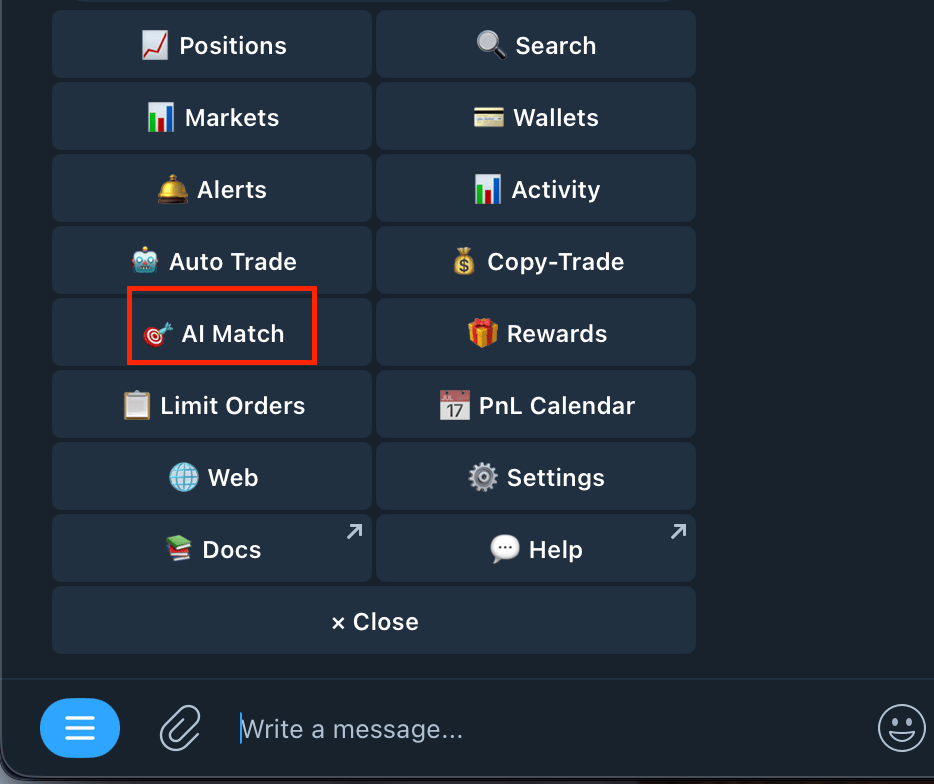
  <Step title="Type /match or Press AI Match on the Homepage">
    <Frame>
      <img src="https://mintcdn.com/kreo/Gp7mWM6IE0cIwMLj/images/Screenshot-2026-04-18-at-5.04.29-PM.png?fit=max&auto=format&n=Gp7mWM6IE0cIwMLj&q=85&s=74466955648c38437d7d3634f370aabc" alt="Screenshot 2026 04 18 At 5 04 29 PM" className="mx-auto" style={{ width:"48%" }} width="934" height="784" data-path="images/Screenshot-2026-04-18-at-5.04.29-PM.png" />
    </Frame>
  </Step>

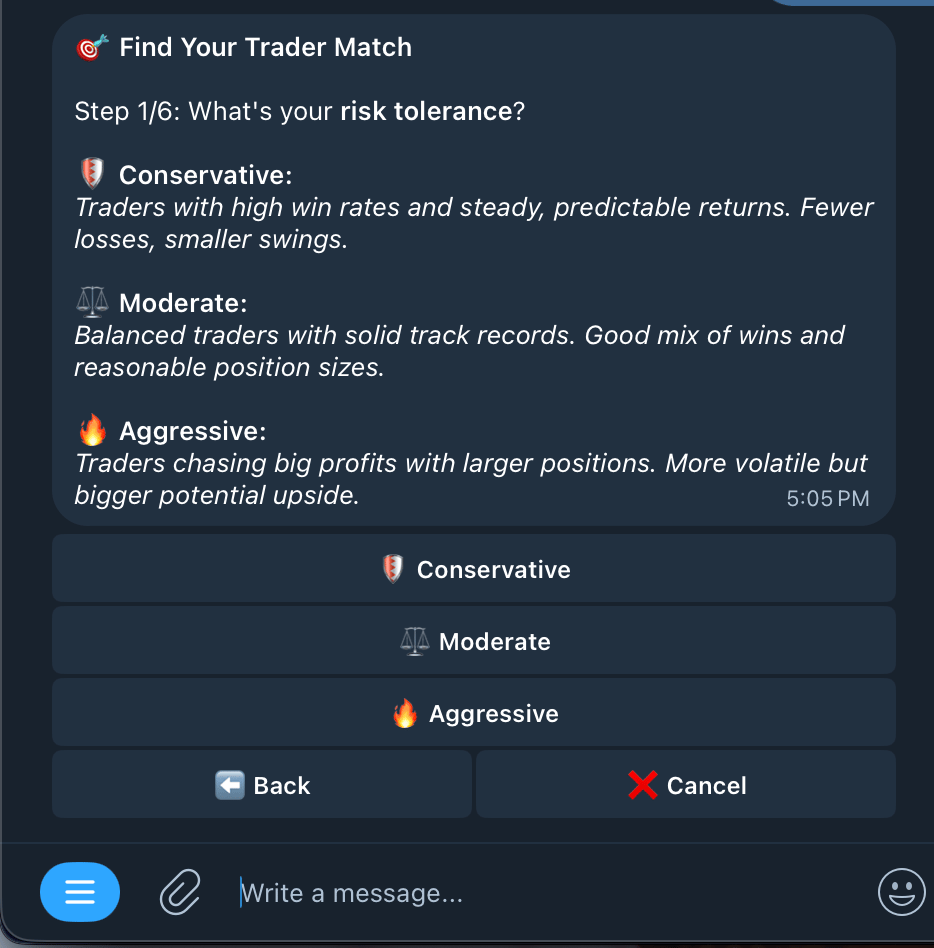
  <Step title="Choose your risk tolerance with Copy Trading">
    <Frame>
      <img src="https://mintcdn.com/kreo/Gp7mWM6IE0cIwMLj/images/Screenshot-2026-04-18-at-5.06.35-PM.png?fit=max&auto=format&n=Gp7mWM6IE0cIwMLj&q=85&s=3cbcc89141f260be5768d84c5c8d4408" alt="Screenshot 2026 04 18 At 5 06 35 PM" className="mx-auto" style={{ width:"48%" }} width="934" height="948" data-path="images/Screenshot-2026-04-18-at-5.06.35-PM.png" />
    </Frame>
  </Step>

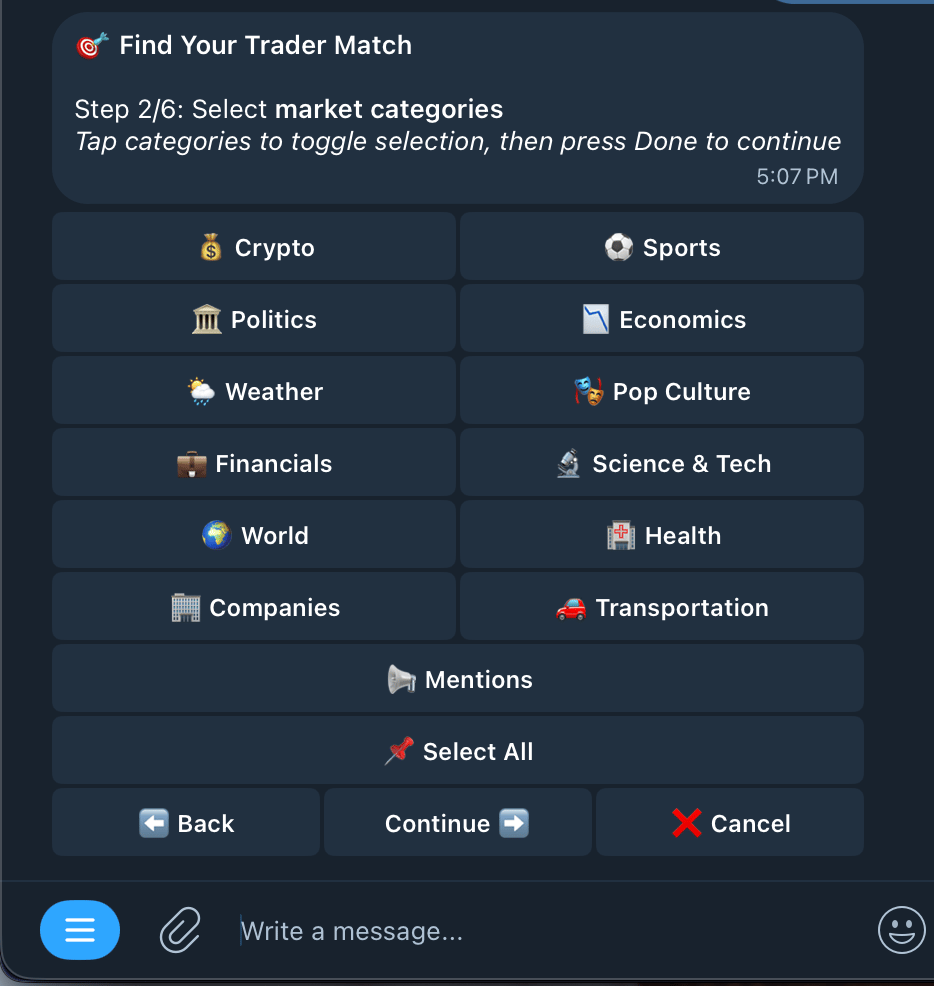
  <Step title="Select Markets you want to copy trade (Select All if you're not worried)">
    <Frame>
      <img src="https://mintcdn.com/kreo/Gp7mWM6IE0cIwMLj/images/Screenshot-2026-04-18-at-5.07.39-PM.png?fit=max&auto=format&n=Gp7mWM6IE0cIwMLj&q=85&s=a6c80531d09246057eef34c1882fdb9a" alt="Screenshot 2026 04 18 At 5 07 39 PM" className="mx-auto" style={{ width:"47%" }} width="934" height="986" data-path="images/Screenshot-2026-04-18-at-5.07.39-PM.png" />
    </Frame>
  </Step>

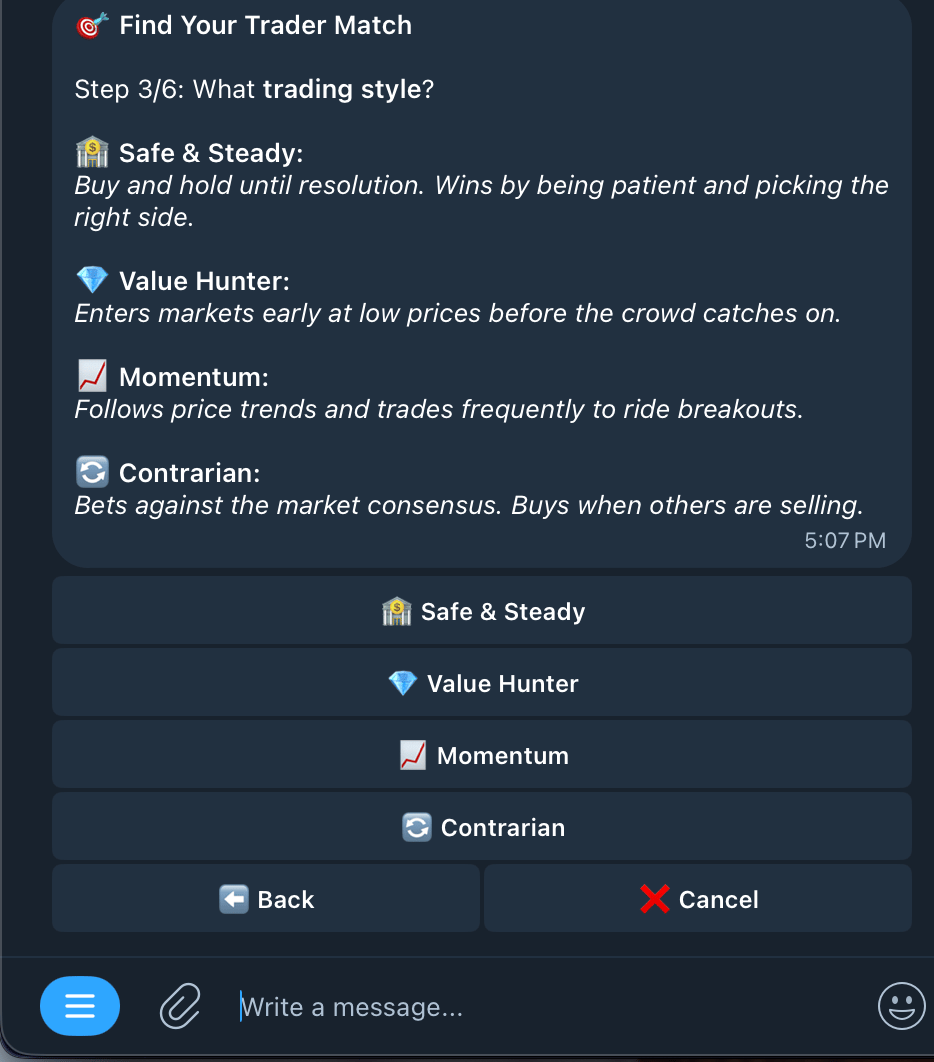
  <Step title="Choose your trading style">
    <Frame>
      <img src="https://mintcdn.com/kreo/Gp7mWM6IE0cIwMLj/images/Screenshot-2026-04-18-at-5.08.31-PM.png?fit=max&auto=format&n=Gp7mWM6IE0cIwMLj&q=85&s=a197774dab60cd8b380ecfe8ce31cc72" alt="Screenshot 2026 04 18 At 5 08 31 PM" className="mx-auto" style={{ width:"47%" }} width="934" height="1062" data-path="images/Screenshot-2026-04-18-at-5.08.31-PM.png" />
    </Frame>
  </Step>

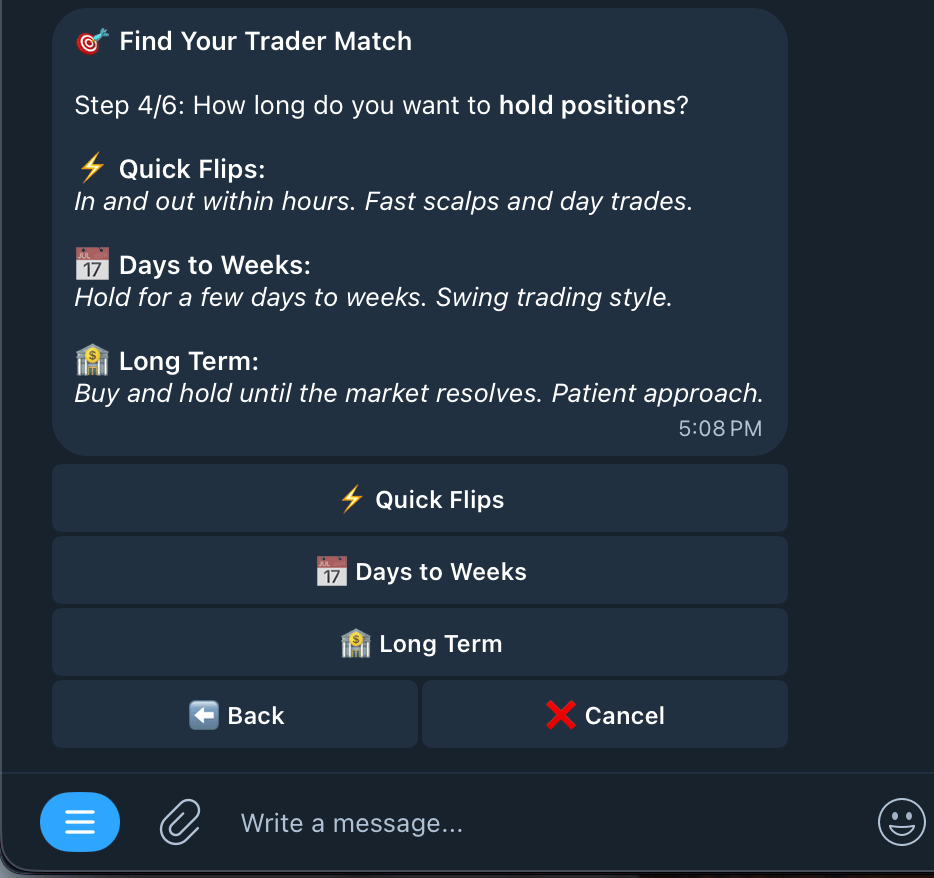
  <Step title="Choose how long you like to hold positions">
    <Frame>
      <img src="https://mintcdn.com/kreo/Gp7mWM6IE0cIwMLj/images/Screenshot-2026-04-18-at-5.09.38-PM.png?fit=max&auto=format&n=Gp7mWM6IE0cIwMLj&q=85&s=3342b85ebe703946ab431324ccb17cc5" alt="Screenshot 2026 04 18 At 5 09 38 PM" className="mx-auto" style={{ width:"47%" }} width="934" height="878" data-path="images/Screenshot-2026-04-18-at-5.09.38-PM.png" />
    </Frame>
  </Step>

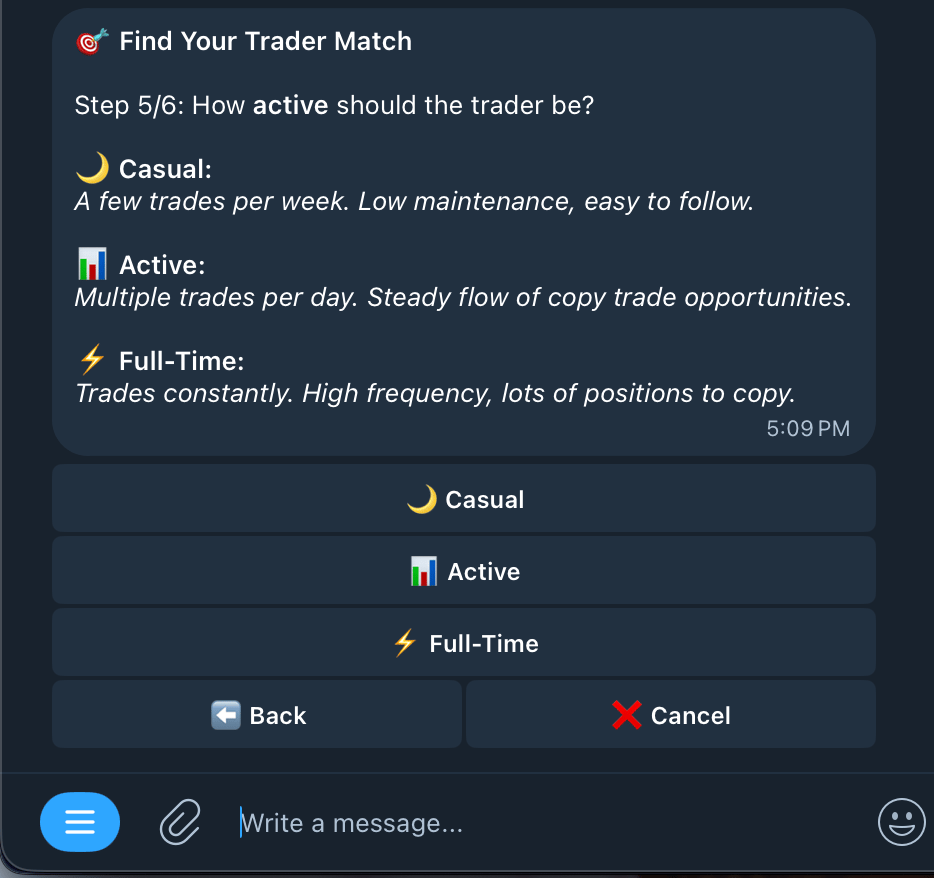
  <Step title="Choose how active traders should be on your list">
    <Frame>
      <img src="https://mintcdn.com/kreo/Gp7mWM6IE0cIwMLj/images/Screenshot-2026-04-18-at-5.10.13-PM.png?fit=max&auto=format&n=Gp7mWM6IE0cIwMLj&q=85&s=c8da9552fcfaa6e0881d9d58634d7b51" alt="Screenshot 2026 04 18 At 5 10 13 PM" className="mx-auto" style={{ width:"50%" }} width="934" height="878" data-path="images/Screenshot-2026-04-18-at-5.10.13-PM.png" />
    </Frame>
  </Step>

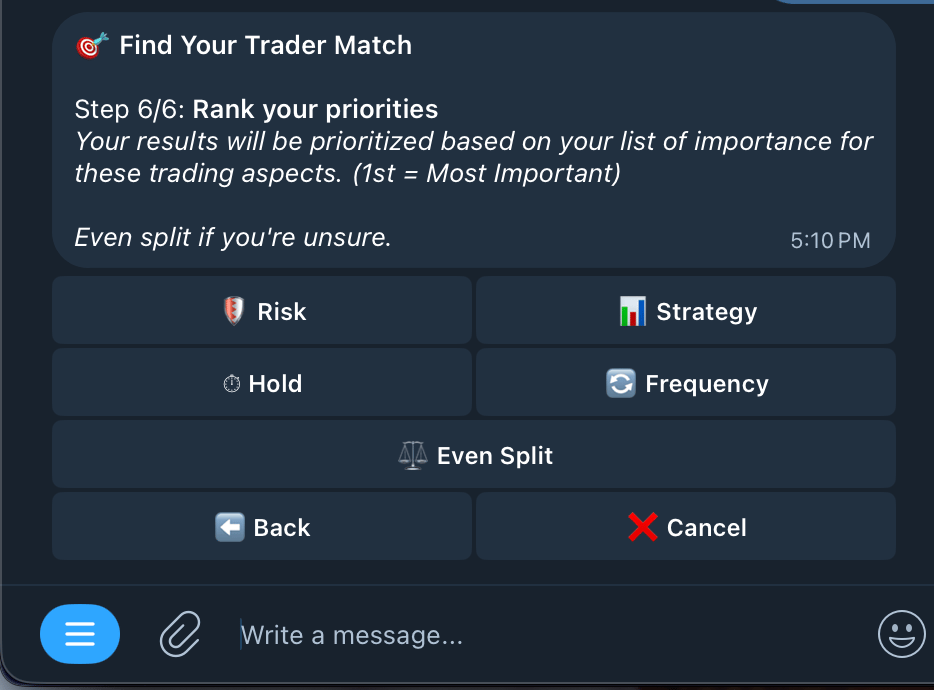
  <Step title="Rank your priorities">
    <Info>
      Rank from most important (1st) to least important (5th) in order to change the prioritization of your list, if you're not too sure, you can click even split for a more balanced outlook.
    </Info>

    <Frame>
      <img src="https://mintcdn.com/kreo/Gp7mWM6IE0cIwMLj/images/Screenshot-2026-04-18-at-5.12.17-PM.png?fit=max&auto=format&n=Gp7mWM6IE0cIwMLj&q=85&s=ce6b9d6a64d3eb494c02155bd6d02479" alt="Screenshot 2026 04 18 At 5 12 17 PM" className="mx-auto" style={{ width:"52%" }} width="934" height="690" data-path="images/Screenshot-2026-04-18-at-5.12.17-PM.png" />
    </Frame>
  </Step>

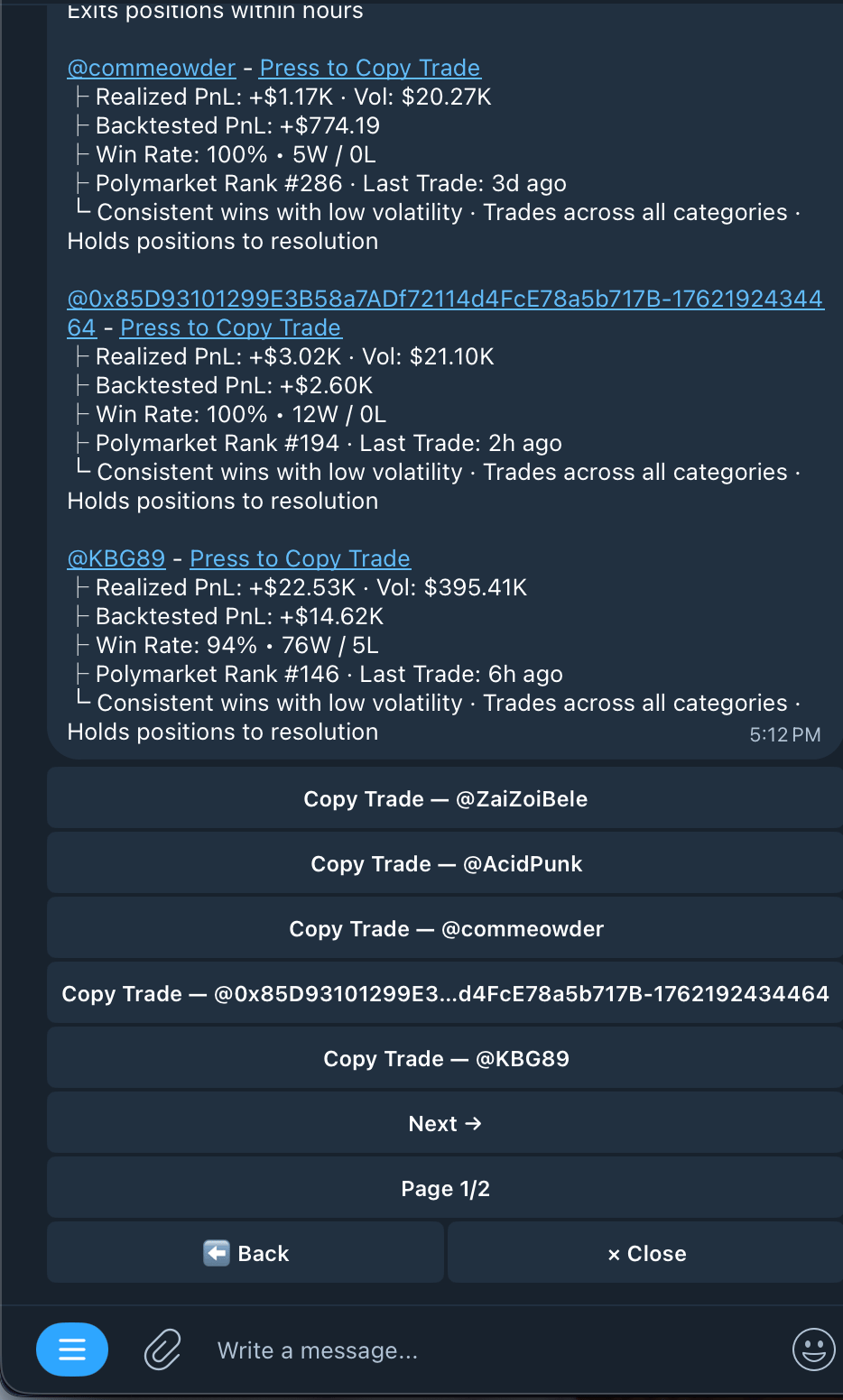
  <Step title="Find your trader matches">
    You can begin copytrading any one of these wallets by pressing on the button or their respective hyperlink.
    <Frame>
      <img src="https://mintcdn.com/kreo/Gp7mWM6IE0cIwMLj/images/Screenshot-2026-04-18-at-5.13.23-PM.png?fit=max&auto=format&n=Gp7mWM6IE0cIwMLj&q=85&s=5fe45252df1c2cef4e4c3a44a3f1de93" alt="Screenshot 2026 04 18 At 5 13 23 PM" className="mx-auto" style={{ width:"38%" }} width="934" height="1552" data-path="images/Screenshot-2026-04-18-at-5.13.23-PM.png" />
    </Frame>
  </Step>
</Steps>

<Tip>
  Important Tips

  ∙	The wallet pool updates hourly, so you’re always getting fresh results

  ∙	Always use /tracker to check a wallet’s trade history and stats before copying

  ∙	Start small when testing a new wallet — don’t go all in right away

  ∙	A wallet being profitable in the past doesn’t guarantee future results

  ∙	Check their longer-term stats (weekly, monthly) not just recent trades

  ∙	DYOR (Do Your Own Research) always
</Tip>