> ## Documentation Index
> Fetch the complete documentation index at: https://docs.kreo.app/llms.txt
> Use this file to discover all available pages before exploring further.

# Edit Address

> Change the wallet address your task is copying.

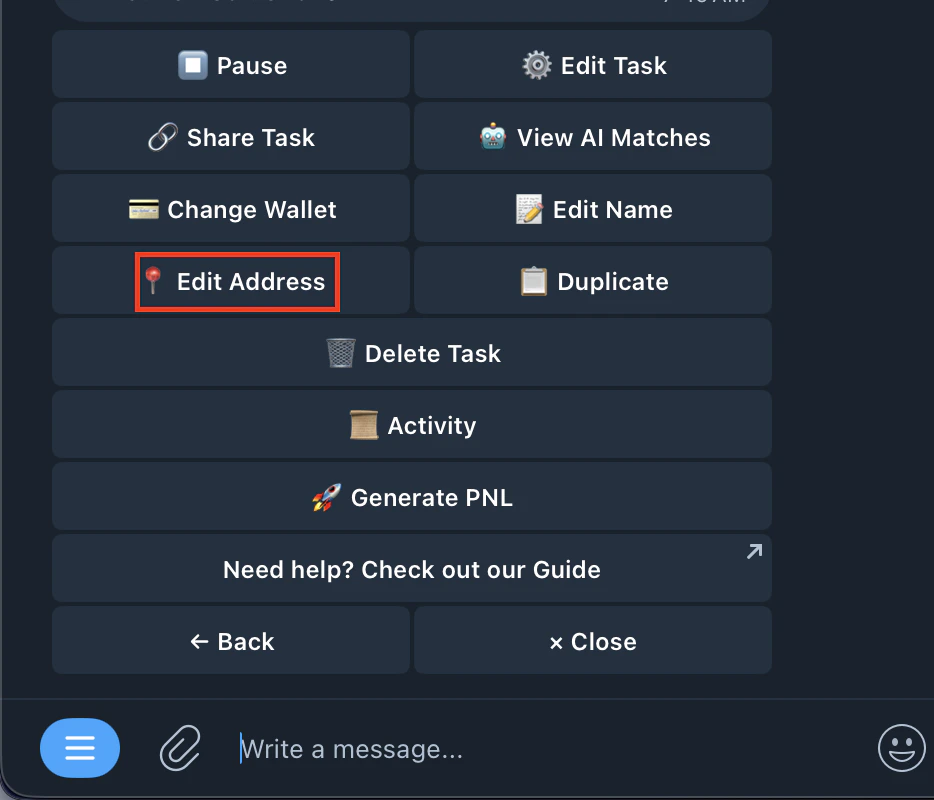
1. Go to your copytrade task
2. Click on Edit Address
   <Frame>
     <img src="https://mintcdn.com/kreo/wunMWoBf03Iw3f_1/images/Screenshot-2026-04-18-at-7.54.52-AM.png?fit=max&auto=format&n=wunMWoBf03Iw3f_1&q=85&s=54eb340ec380d1e7807e1aa234e0e110" alt="Screenshot 2026 04 18 At 7 54 52 AM" className="mx-auto" style={{ width:"53%" }} width="934" height="800" data-path="images/Screenshot-2026-04-18-at-7.54.52-AM.png" />
   </Frame>
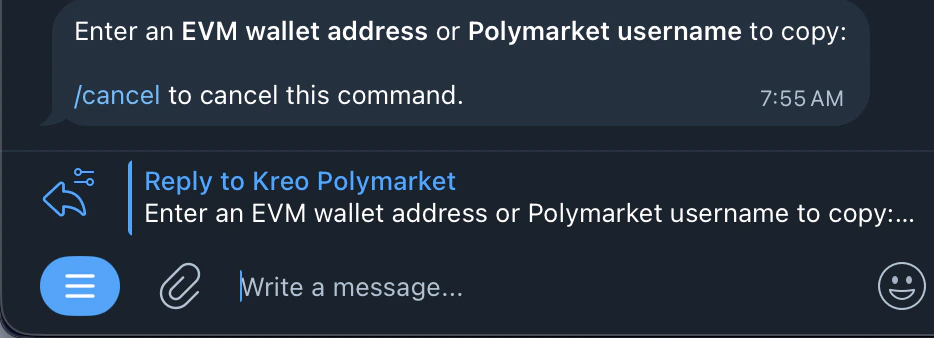
3. Enter an **EVM wallet address** or **Polymarket username** to copy
   <Frame>
     <img src="https://mintcdn.com/kreo/wunMWoBf03Iw3f_1/images/Screenshot-2026-04-18-at-7.56.10-AM.png?fit=max&auto=format&n=wunMWoBf03Iw3f_1&q=85&s=b6eb64d1e0a69ec19ff21c537ed37f64" alt="Screenshot 2026 04 18 At 7 56 10 AM" className="mx-auto" style={{ width:"62%" }} width="934" height="338" data-path="images/Screenshot-2026-04-18-at-7.56.10-AM.png" />
   </Frame>
4. Done
