> ## Documentation Index
> Fetch the complete documentation index at: https://docs.kreo.app/llms.txt
> Use this file to discover all available pages before exploring further.
# Overview
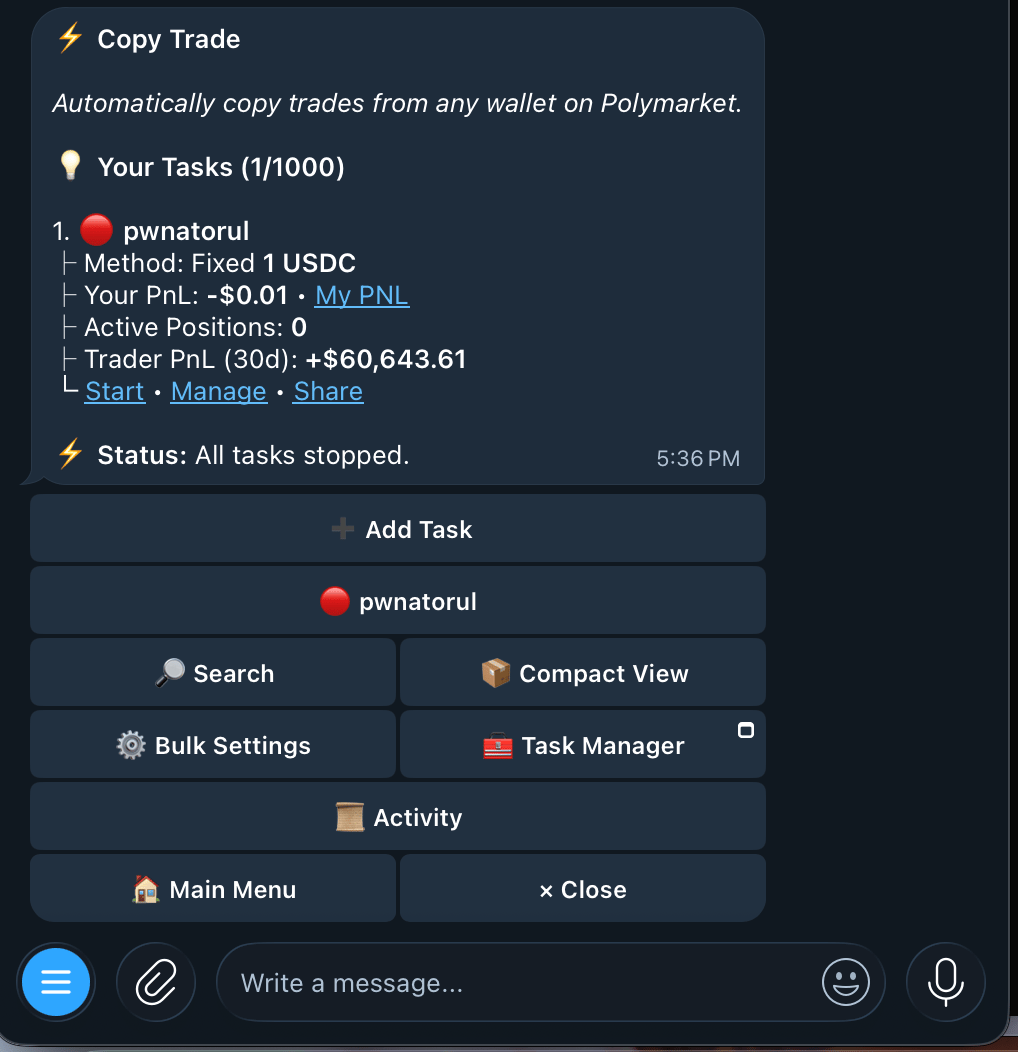 | Button | What it does |
| :----------------------------------------------------------------- | :----------------------------------------------- |
| [➕ Add Task](https://docs.kreo.app/add-task) | Create a new copy trade task |
| 🔎 Search | Filter tasks by wallet address |
| 📦 **Compact View** | Show up to 40 tasks on one page |
| [⚙️ Bulk Settings](https://docs.kreo.app/bulk-settings) | Edit settings across multiple tasks at once |
| [🧰 Task Manager](https://docs.kreo.app/task-manager) | Open the copy trade manager mini-app |
| 📜 **Activity** | View global copy trade activity across all tasks |
| Button | What it does |
| :----------------------------------------------------------------- | :----------------------------------------------- |
| [➕ Add Task](https://docs.kreo.app/add-task) | Create a new copy trade task |
| 🔎 Search | Filter tasks by wallet address |
| 📦 **Compact View** | Show up to 40 tasks on one page |
| [⚙️ Bulk Settings](https://docs.kreo.app/bulk-settings) | Edit settings across multiple tasks at once |
| [🧰 Task Manager](https://docs.kreo.app/task-manager) | Open the copy trade manager mini-app |
| 📜 **Activity** | View global copy trade activity across all tasks |