> ## Documentation Index
> Fetch the complete documentation index at: https://docs.kreo.app/llms.txt
> Use this file to discover all available pages before exploring further.
# Crypto Advanced
> Access Advanced Settings by tapping **⚙️ Advanced** from the Edit Task menu. From here you can fine-tune how the bot enters and exits trades.
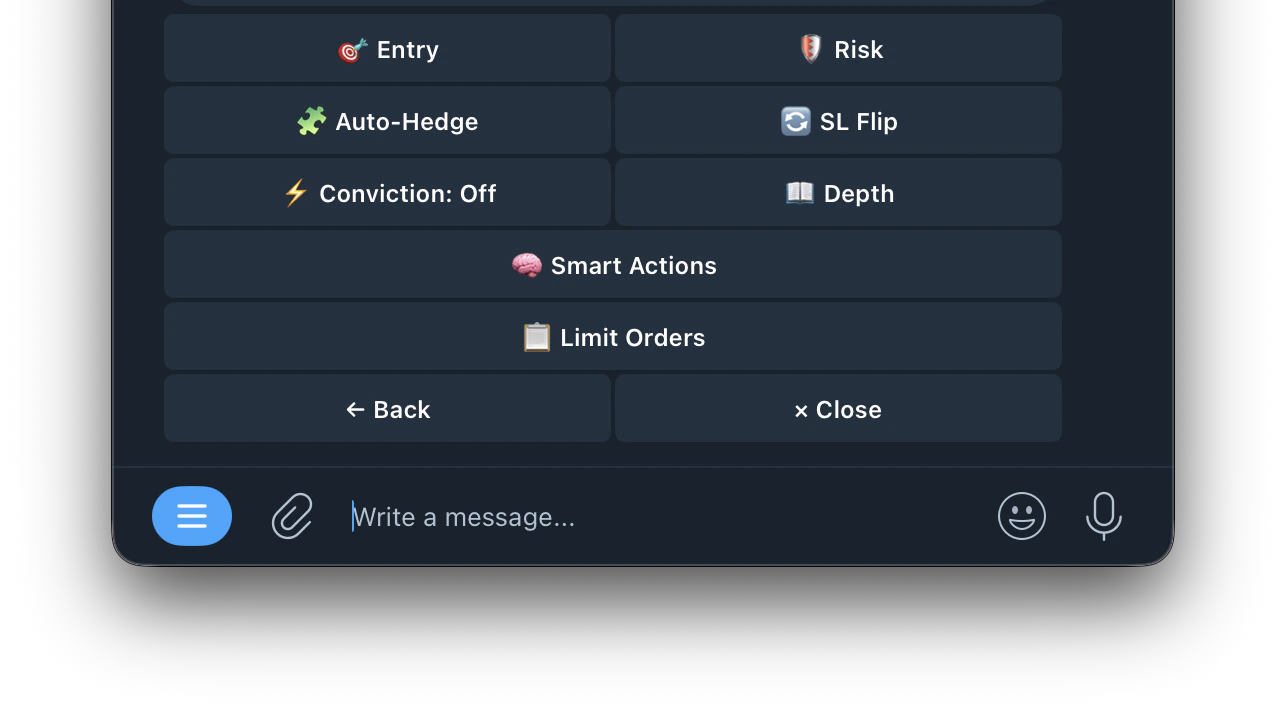 ## 🎯 Entry
#### Configure when the bot is allowed to enter a trade. Settings differ based on your Entry Mode.
**📊 Market Price Mode**
Only trade when price is inside this range
Only trade during this window
Skips wide spreads
Up, Down, or Both
**🔮 Crypto Price Mode**
How far crypto price must be from the price to beat. Two modes: Percent (%) or Fixed (\$). Tap to switch
Minimum gap between fair value and current market price
Only trade during this window, in seconds (e.g. 265s–299s)
Skips wide bid/ask gaps. Smaller = tighter fills
Max crypto price change per minute (%). Skips if moving too fast. OFF to disable
Only enter when crypto is trending in the same direction as the signal
When Spike Mode is on, time/price/side filters are bypassed for trigger decisions.
## 🛡️ Risk
> Protect your positions and automate your exits. Set rules for when the bot should sell — whether to lock in profit, cut losses, or exit stale trades.
Automatically sells your position when the price moves in your favor by your set target.
| Setting | What it means |
| :---------------- | :----------------------------------------------------------------------------------------------------------- |
| **Percentage** | Sells when price rises X% from your entry. Example: 30% TP on a 50¢ entry triggers at 65¢ |
| **Fixed Price** | Sells when price reaches a specific value. Example: sell when price hits 90¢ |
| **Layered Exits** | Set multiple TP levels with different share allocations. Example: sell 50% at +20% and remaining 50% at +50% |
Each copied buy gets its own take profit — it only affects shares from that specific trade.\
[Click here for more details](https://docs.kreo.app/take-profit)
Automatically sells your position when the price drops below a set threshold. Limits your losses.
| Setting | What it means |
| :---------------- | :----------------------------------------------------------------------------------------------------------------------------------- |
| **Percentage** | Sells if price drops X% from your entry. Example: 20% SL on an 80¢ entry triggers at 64¢ |
| **Fixed Price** | Sells when price drops to a specific value. Example: sell if price falls to 40¢ |
| **Trailing** | Dynamic SL that moves up with the price. Locks in gains as price rises — only triggers if price reverses by your set % from the peak |
| **Layered Exits** | Set multiple SL levels with different share allocations. Example: sell 50% at -20% and remaining 50% at -40% |
Each copied buy gets its own stop loss — it only affects shares from that specific trade.\
[Click here for more details](https://docs.kreo.app/stop-loss-settings)
Exits a position if the price hasn't moved enough after a set time window. Useful for getting out of stale trades that aren't going anywhere.
| Setting | What it means |
| :----------------- | :------------------------------------------------------------------------------------------------------------- |
| **Timeout Window** | How long to wait after entry before checking if the price has moved enough |
| **Min Move %** | Minimum price movement required within the window. If the price hasn't moved this much, the position is exited |
Example: set 250s timeout with 30% min move — if the price hasn't moved 30% within 250 seconds of entry, the bot exits the position automatically.
Sets the maximum allowed price movement speed. If the market is moving too fast, the bot skips entry to avoid chasing volatile spikes.
| Setting | What it means |
| :----------------- | :------------------------------------------------------------------------------------------------------------------------ |
| **Max Velocity %** | Maximum price change per minute allowed. Example: set to 2% — if price moves more than 2% per minute, the bot skips entry |
Set to 0 or OFF to disable. Lower = more selective, fewer entries. Higher = more entries but may catch volatile spikes.
Sets a waiting period before the bot can enter again after an exit. Prevents the bot from immediately re-entering after a stop loss or take profit.
| Setting | What it means |
| :--------------------- | :------------------------------------------------------------------------------------------------------------------------------------- |
| **Cooldown (seconds)** | How long to wait after an exit before the bot can enter a new trade. Example: 60s = wait 1 minute after any exit before entering again |
Useful for avoiding repeated losses in choppy markets — gives the market time to settle before re-entering.
## 🧩 Auto-Hedge
Auto-Hedge monitors the opposite side of your position and enters a hedge when the estimated result is net-positive after fees.
1. Monitors the opposite-side live price while the market is open
2. Sends a hedge only when your thresholds are met
3. If thresholds are not met, it waits and skips bad hedges
* **Enabled**: turn Auto-Hedge on or off
* **Min Profit**: required net profit after fees before hedging (e.g. 2.00%)
* **Max Combined Cost**: entry price + hedge price must stay at or below this value (e.g. 0.970)
* **Auto-Merge**: when on, automatically merges YES+NO pairs and redeems to \~\$1 USDC per pair on-chain after hedge fills. When off, both sides remain in wallet for manual management
## 🔄 SL Flip
When your stop-loss triggers it usually means price moved against you. SL Flip automatically enters the opposite side immediately to ride that confirmed move.
**Example:** You bought Up at \$0.80 and price drops to \$0.55 triggering your stop-loss. SL Flip instantly buys Down to capture the confirmed downward move.
* **Enabled**: turn SL Flip on or off
* **Amount**: how much of the original trade to use for the flip (100% = same size)
* **Max Entry Price**: skip the flip if the opposite side costs more than this
* **Min Time Remaining:** skip the flip if the market window is about to close
* **Flip Stop-Loss**: stop-loss % for the flip trade (0 = uses your task's default SL)
## ⚡️ Conviction
Controls whether the bot waits for crypto price confirmation before entering.
* **Off**: enter immediately, no confirmation needed
* **Spike**: wait for a sharp price move in the signal's direction before entering
* **Drift**: wait for a steady price trend in the signal's direction before entering
## 📖 Depth
Watches the orderbook for sudden changes. Thinning, imbalance shifts, spread blowouts and price gaps. Enters early when the book changes before the price catches up.
* **Standalone**: enters on orderbook changes alone, ignores conviction
* **Confirm**: orderbook depth must confirm the conviction signal
* **Boost**: lowers the conviction threshold when depth signal fires
* **Low**: only fires on extreme orderbook changes
* **Medium**: balanced, fires on moderate changes
* **High**: fires on smaller changes, more entries
triggers when the bid-ask spread blows open wider than your set threshold in cents. Set to 0 to disable.
* **Depth Drop** — volume must drop this much from peak to trigger (default 60%)
* **Baseline** — how far back to look for normal book state (default 30s)
* **Recent** — how many seconds of recent data to compare (default 3s)
* **Imbalance Shift** — how much bid/ask ratio must shift from baseline (default 0.35)
* **Spread Mult** — spread must widen by this multiplier vs baseline (default 3.0x)
* **Price Gap** — minimum price jump in cents to trigger (default 5¢)
* **Boost Reduction** — in Boost mode, how much to lower the conviction threshold (default 20%)
If Conviction is off, use Standalone mode for depth-only entries. Confirm and Boost modes require Conviction to be enabled.
## 🧠 Smart Actions
Automatically adjust task settings based on trading performance. Rules can tighten entry filters, reduce size, pause entries or apply presets after losing streaks.
## 🎯 Entry
#### Configure when the bot is allowed to enter a trade. Settings differ based on your Entry Mode.
**📊 Market Price Mode**
Only trade when price is inside this range
Only trade during this window
Skips wide spreads
Up, Down, or Both
**🔮 Crypto Price Mode**
How far crypto price must be from the price to beat. Two modes: Percent (%) or Fixed (\$). Tap to switch
Minimum gap between fair value and current market price
Only trade during this window, in seconds (e.g. 265s–299s)
Skips wide bid/ask gaps. Smaller = tighter fills
Max crypto price change per minute (%). Skips if moving too fast. OFF to disable
Only enter when crypto is trending in the same direction as the signal
When Spike Mode is on, time/price/side filters are bypassed for trigger decisions.
## 🛡️ Risk
> Protect your positions and automate your exits. Set rules for when the bot should sell — whether to lock in profit, cut losses, or exit stale trades.
Automatically sells your position when the price moves in your favor by your set target.
| Setting | What it means |
| :---------------- | :----------------------------------------------------------------------------------------------------------- |
| **Percentage** | Sells when price rises X% from your entry. Example: 30% TP on a 50¢ entry triggers at 65¢ |
| **Fixed Price** | Sells when price reaches a specific value. Example: sell when price hits 90¢ |
| **Layered Exits** | Set multiple TP levels with different share allocations. Example: sell 50% at +20% and remaining 50% at +50% |
Each copied buy gets its own take profit — it only affects shares from that specific trade.\
[Click here for more details](https://docs.kreo.app/take-profit)
Automatically sells your position when the price drops below a set threshold. Limits your losses.
| Setting | What it means |
| :---------------- | :----------------------------------------------------------------------------------------------------------------------------------- |
| **Percentage** | Sells if price drops X% from your entry. Example: 20% SL on an 80¢ entry triggers at 64¢ |
| **Fixed Price** | Sells when price drops to a specific value. Example: sell if price falls to 40¢ |
| **Trailing** | Dynamic SL that moves up with the price. Locks in gains as price rises — only triggers if price reverses by your set % from the peak |
| **Layered Exits** | Set multiple SL levels with different share allocations. Example: sell 50% at -20% and remaining 50% at -40% |
Each copied buy gets its own stop loss — it only affects shares from that specific trade.\
[Click here for more details](https://docs.kreo.app/stop-loss-settings)
Exits a position if the price hasn't moved enough after a set time window. Useful for getting out of stale trades that aren't going anywhere.
| Setting | What it means |
| :----------------- | :------------------------------------------------------------------------------------------------------------- |
| **Timeout Window** | How long to wait after entry before checking if the price has moved enough |
| **Min Move %** | Minimum price movement required within the window. If the price hasn't moved this much, the position is exited |
Example: set 250s timeout with 30% min move — if the price hasn't moved 30% within 250 seconds of entry, the bot exits the position automatically.
Sets the maximum allowed price movement speed. If the market is moving too fast, the bot skips entry to avoid chasing volatile spikes.
| Setting | What it means |
| :----------------- | :------------------------------------------------------------------------------------------------------------------------ |
| **Max Velocity %** | Maximum price change per minute allowed. Example: set to 2% — if price moves more than 2% per minute, the bot skips entry |
Set to 0 or OFF to disable. Lower = more selective, fewer entries. Higher = more entries but may catch volatile spikes.
Sets a waiting period before the bot can enter again after an exit. Prevents the bot from immediately re-entering after a stop loss or take profit.
| Setting | What it means |
| :--------------------- | :------------------------------------------------------------------------------------------------------------------------------------- |
| **Cooldown (seconds)** | How long to wait after an exit before the bot can enter a new trade. Example: 60s = wait 1 minute after any exit before entering again |
Useful for avoiding repeated losses in choppy markets — gives the market time to settle before re-entering.
## 🧩 Auto-Hedge
Auto-Hedge monitors the opposite side of your position and enters a hedge when the estimated result is net-positive after fees.
1. Monitors the opposite-side live price while the market is open
2. Sends a hedge only when your thresholds are met
3. If thresholds are not met, it waits and skips bad hedges
* **Enabled**: turn Auto-Hedge on or off
* **Min Profit**: required net profit after fees before hedging (e.g. 2.00%)
* **Max Combined Cost**: entry price + hedge price must stay at or below this value (e.g. 0.970)
* **Auto-Merge**: when on, automatically merges YES+NO pairs and redeems to \~\$1 USDC per pair on-chain after hedge fills. When off, both sides remain in wallet for manual management
## 🔄 SL Flip
When your stop-loss triggers it usually means price moved against you. SL Flip automatically enters the opposite side immediately to ride that confirmed move.
**Example:** You bought Up at \$0.80 and price drops to \$0.55 triggering your stop-loss. SL Flip instantly buys Down to capture the confirmed downward move.
* **Enabled**: turn SL Flip on or off
* **Amount**: how much of the original trade to use for the flip (100% = same size)
* **Max Entry Price**: skip the flip if the opposite side costs more than this
* **Min Time Remaining:** skip the flip if the market window is about to close
* **Flip Stop-Loss**: stop-loss % for the flip trade (0 = uses your task's default SL)
## ⚡️ Conviction
Controls whether the bot waits for crypto price confirmation before entering.
* **Off**: enter immediately, no confirmation needed
* **Spike**: wait for a sharp price move in the signal's direction before entering
* **Drift**: wait for a steady price trend in the signal's direction before entering
## 📖 Depth
Watches the orderbook for sudden changes. Thinning, imbalance shifts, spread blowouts and price gaps. Enters early when the book changes before the price catches up.
* **Standalone**: enters on orderbook changes alone, ignores conviction
* **Confirm**: orderbook depth must confirm the conviction signal
* **Boost**: lowers the conviction threshold when depth signal fires
* **Low**: only fires on extreme orderbook changes
* **Medium**: balanced, fires on moderate changes
* **High**: fires on smaller changes, more entries
triggers when the bid-ask spread blows open wider than your set threshold in cents. Set to 0 to disable.
* **Depth Drop** — volume must drop this much from peak to trigger (default 60%)
* **Baseline** — how far back to look for normal book state (default 30s)
* **Recent** — how many seconds of recent data to compare (default 3s)
* **Imbalance Shift** — how much bid/ask ratio must shift from baseline (default 0.35)
* **Spread Mult** — spread must widen by this multiplier vs baseline (default 3.0x)
* **Price Gap** — minimum price jump in cents to trigger (default 5¢)
* **Boost Reduction** — in Boost mode, how much to lower the conviction threshold (default 20%)
If Conviction is off, use Standalone mode for depth-only entries. Confirm and Boost modes require Conviction to be enabled.
## 🧠 Smart Actions
Automatically adjust task settings based on trading performance. Rules can tighten entry filters, reduce size, pause entries or apply presets after losing streaks.
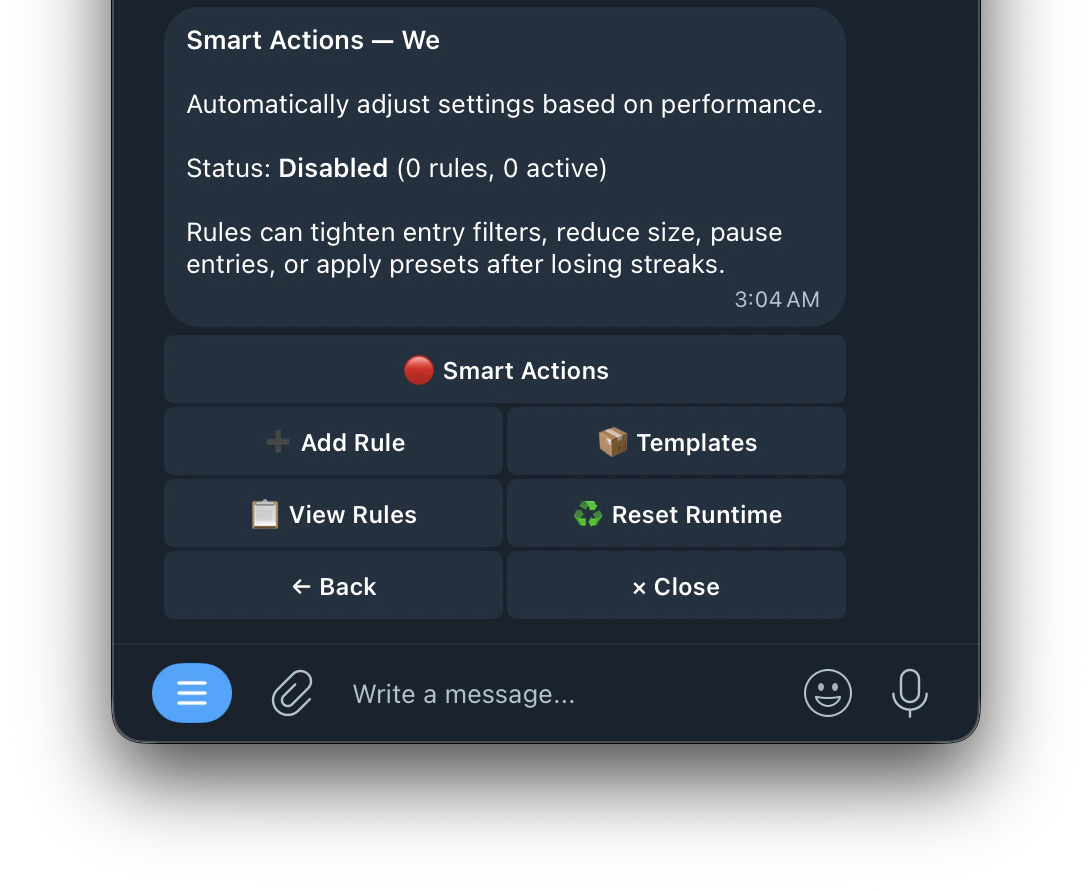 | Buttons | Function |
| -------------------- | -------------------------------------- |
| **➕ Add Rule** | create a new rule with a 5 step wizard |
| **📦 Templates** | apply pre-built rule templates |
| **📋 View Rules** | see all active rules |
| **♻️ Reset Runtime** | reset the rule counters |
> Choose what condition causes the smart action to fire. Each trigger watches your trading performance and activates when the condition is met.
| Trigger | What it means | Example |
| :--------------------- | :--------------------------------------------------------------------------- | :-------------------------------------------------------------------------------- |
| **Consecutive Losses** | Fires after X losses in a row without a win in between | Set to 3 — fires after losing 3 trades back to back |
| **Losses in Window** | Fires after X losses within a set time period, regardless of wins in between | Set to 5 losses in 1 hour — fires if you lose 5 times within any 60 minute window |
| **Consecutive Wins** | Fires after X wins in a row without a loss in between | Set to 5 — fires after winning 5 trades back to back |
| **Win Rate Below %** | Fires when your win rate drops below a set percentage | Set to 40% — fires if your win rate falls below 40% |
| **Total Loss Amount** | Fires when your total losses reach a set dollar amount | Set to \$50 — fires once you've lost \$50 in total |
* **Pause After 5 Losses** — pause entries for 10 minutes after 5 consecutive losses
* **Safe Mode on Losing Streak** — apply safe 5m preset if losses cluster within 30 minutes
* **Halve Size on Drawdown** — cut position size in half when cumulative loss reaches \$20
* **Tighten Spread After Losses** — lower max spread after 3 consecutive losses
## 📋 Limit Orders
Place limit orders instead of market orders for potentially better fills.
| Buttons | Function |
| -------------------- | -------------------------------------- |
| **➕ Add Rule** | create a new rule with a 5 step wizard |
| **📦 Templates** | apply pre-built rule templates |
| **📋 View Rules** | see all active rules |
| **♻️ Reset Runtime** | reset the rule counters |
> Choose what condition causes the smart action to fire. Each trigger watches your trading performance and activates when the condition is met.
| Trigger | What it means | Example |
| :--------------------- | :--------------------------------------------------------------------------- | :-------------------------------------------------------------------------------- |
| **Consecutive Losses** | Fires after X losses in a row without a win in between | Set to 3 — fires after losing 3 trades back to back |
| **Losses in Window** | Fires after X losses within a set time period, regardless of wins in between | Set to 5 losses in 1 hour — fires if you lose 5 times within any 60 minute window |
| **Consecutive Wins** | Fires after X wins in a row without a loss in between | Set to 5 — fires after winning 5 trades back to back |
| **Win Rate Below %** | Fires when your win rate drops below a set percentage | Set to 40% — fires if your win rate falls below 40% |
| **Total Loss Amount** | Fires when your total losses reach a set dollar amount | Set to \$50 — fires once you've lost \$50 in total |
* **Pause After 5 Losses** — pause entries for 10 minutes after 5 consecutive losses
* **Safe Mode on Losing Streak** — apply safe 5m preset if losses cluster within 30 minutes
* **Halve Size on Drawdown** — cut position size in half when cumulative loss reaches \$20
* **Tighten Spread After Losses** — lower max spread after 3 consecutive losses
## 📋 Limit Orders
Place limit orders instead of market orders for potentially better fills.
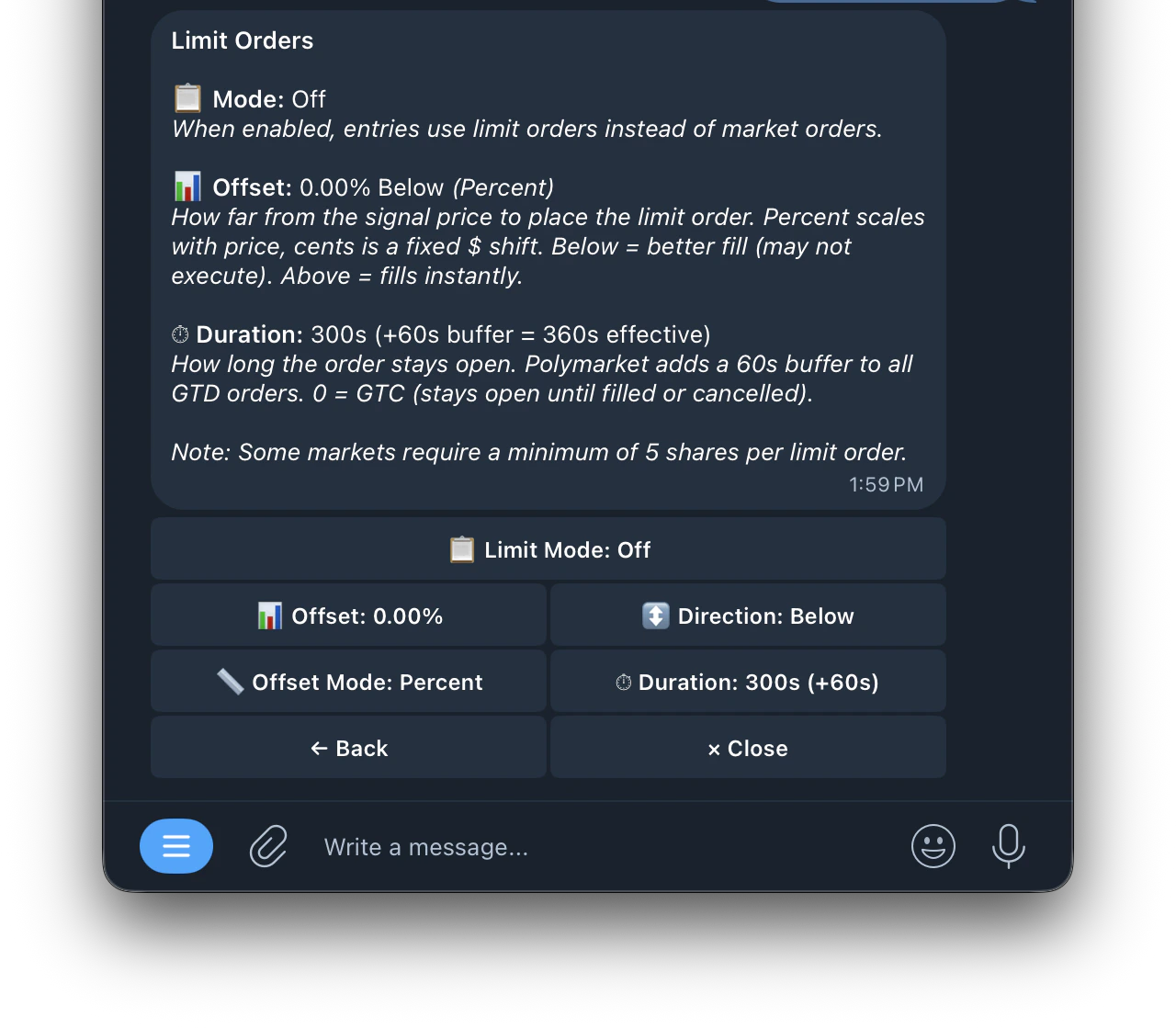 | Setting | What it means |
| :----------- | :------------------------------------------------------------------------------------------------------------------------------------------------------------------------------------------------------------------------------------------------------------------------------------------------------------- |
| **Mode** | Toggle limit orders on or off. When off, the bot uses market orders that fill instantly at best available price |
| **Offset** | How far from the signal price to place your limit order. Two modes: **Percent (%)** — offset scales with the market price. **Cents (\$)** — fixed dollar amount shift. **Below** = better fill price but may not execute if market doesn't reach it. **Above** = fills instantly but at a slightly worse price |
| **Duration** | How long the limit order stays open in seconds. Polymarket automatically adds a 60s buffer to all orders. Example: set 300s → effective duration is 360s. Set **0** = GTC (Good Till Cancelled) — stays open until filled or manually cancelled |
**Example:**\
Signal price is 50¢ with offset 2% Below → limit order placed at 49¢. The bot waits for the price to drop to 49¢ before filling. If it doesn't reach 49¢ within your duration, the order expires.
Some markets require a minimum of 5 shares per limit order.
| Setting | What it means |
| :----------- | :------------------------------------------------------------------------------------------------------------------------------------------------------------------------------------------------------------------------------------------------------------------------------------------------------------- |
| **Mode** | Toggle limit orders on or off. When off, the bot uses market orders that fill instantly at best available price |
| **Offset** | How far from the signal price to place your limit order. Two modes: **Percent (%)** — offset scales with the market price. **Cents (\$)** — fixed dollar amount shift. **Below** = better fill price but may not execute if market doesn't reach it. **Above** = fills instantly but at a slightly worse price |
| **Duration** | How long the limit order stays open in seconds. Polymarket automatically adds a 60s buffer to all orders. Example: set 300s → effective duration is 360s. Set **0** = GTC (Good Till Cancelled) — stays open until filled or manually cancelled |
**Example:**\
Signal price is 50¢ with offset 2% Below → limit order placed at 49¢. The bot waits for the price to drop to 49¢ before filling. If it doesn't reach 49¢ within your duration, the order expires.
Some markets require a minimum of 5 shares per limit order.